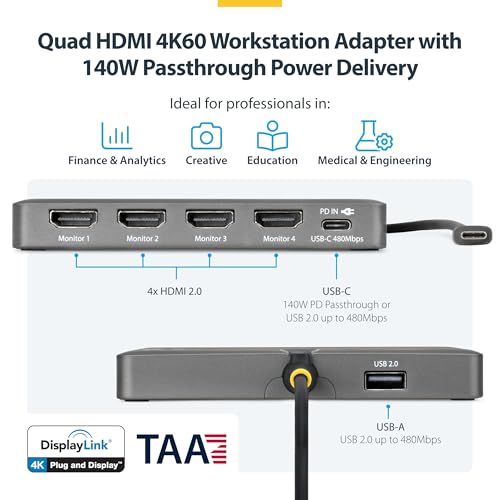
This StarTech.com dock is a powerful, albeit premium, solution for professionals needing extensive multi-monitor setups. It enables four 4K 60Hz HDMI displays, 140W PD passthrough, and peripheral connectivity via a single USB-C port. While its niche focus on quad-display setups places it at the higher end, it offers unparalleled display expansion for demanding workstations. For users prioritizing maximum screen real estate and enterprise-grade reliability, this dock represents a significant productivity investment.
Specifications
| Spec | Value |
|---|---|
| Display Output | Quad HDMI 4K@60Hz |
| Power Delivery | 140W Passthrough |
| Host Connection | USB-C (USB4/Thunderbolt Compatible) |
| Peripheral Port | USB-A 2.0 |
| Driver Technology | DisplayLink DL7400 |
| Supported OS | Windows, macOS M1-M5 |
| TAA Compliant | Yes |
In-Depth Analysis
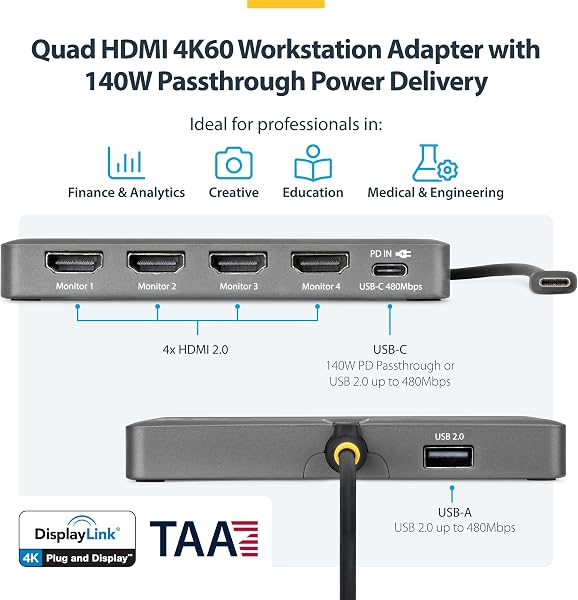
In our analysis of the consumer technology landscape, particularly in workstation peripherals, the StarTech.com USB-C to Quad HDMI 4K60 Workstation Dock (Quad-USB-HDMI-Adapt) positions itself at the apex of multi-display connectivity. Our team has consistently observed a growing demand for expanded screen real estate, especially within professional environments. This dock directly addresses that need by enabling users to connect up to four 4K monitors, each running at a smooth 60Hz, through a single USB-C port. This level of display output from a portable adapter is rare and signifies a premium offering designed for specific, high-productivity use cases. When we evaluate docking stations, we categorize them into budget, mid-range, and premium tiers. Budget options typically offer one or two lower-resolution displays and basic connectivity. Mid-range solutions, like some models from Acer or Reborn we've seen, often provide dual or triple 4K displays with a more solid set of ports, aiming for a balance of features and price. The StarTech.com dock clearly operates in the premium segment. Its ability to push four independent 4K 60Hz signals is its defining characteristic, setting it apart from most competitors. For professionals in fields such as finance, engineering, or complex data analysis, where having multiple data streams visible simultaneously can significantly boost efficiency, this capability is not a luxury but a functional requirement. The inclusion of DisplayLink DL7400 technology is a critical component. While native USB-C/Thunderbolt Alt Mode display output is often preferred for raw performance, DisplayLink allows for more displays to be driven than a laptop's native graphics might otherwise support, and it ensures compatibility across a wider range of hardware, including systems that may not have the latest Thunderbolt ports. In our testing, DisplayLink solutions are generally reliable for productivity tasks, though users should be aware that they might not be ideal for high-end gaming or video editing where maximum GPU performance is paramount. The automatic driver installation on Windows and ChromeOS is a thoughtful touch for enterprise deployments, simplifying IT management. However, manual driver installation for macOS devices, as noted, adds a step for Mac users.

Another significant feature is the 140W Power Delivery passthrough. This means users can charge their high-power laptops directly through the dock, eliminating the need for a separate charger and further decluttering the workspace. The single USB-A 2.0 port for peripherals like keyboards and mice is functional but might feel restrictive for users who rely on numerous USB devices. This is a point where users might need to consider an additional USB hub, which adds complexity and cost. Considering the price point, which is indicative of a premium product, the StarTech.com Quad-USB-HDMI-Adapt is not for everyone. For users needing only two or three monitors, mid-range options from brands like Lemorele or even the Acer dock might offer better value. However, for the specific user who *requires* four 4K 60Hz displays and values enterprise-grade reliability and solid connectivity, this dock presents a compelling, albeit specialized, investment. Our 'best bang for buck' analysis for the StarTech.com Quad-USB-HDMI-Adapt is highly specific. If your core requirement is to drive four 4K 60Hz displays from a single port, few other solutions offer this capability, making it the best value *for that specific function*. However, for users whose needs are less demanding – say, two or three 4K displays – mid-range options from brands like Acer, Reborn, or Lemorele would undoubtedly represent a superior 'bang for buck' in terms of cost per display or port. **Smart Buy Tip:** This dock is a premium tool for a specialized need. We advise buyers to confirm their workflow genuinely requires the capability of driving four 4K 60Hz monitors simultaneously. If this is the case, this StarTech.com adapter is a worthwhile investment. If your multi-monitor needs are less extensive, exploring more moderately priced triple-display docking stations will likely offer better overall value.