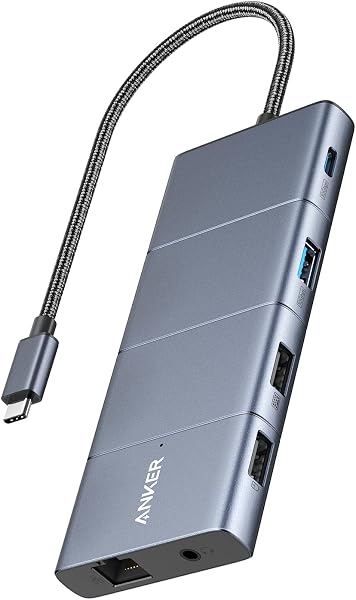
The Lemorele 13-in-1 USB-C Docking Station offers extensive connectivity and triple monitor support at a budget-friendly price. Our team found its 4K@60Hz dual display capability and numerous ports to be highly functional for productivity. However, potential buyers must be aware of reported intermittent disconnects, limitations for triple 4K@30Hz output requiring specific laptop specs, and the need for a separate high-wattage PD charger. It's a solid value for basic expansion but may not suit users requiring absolute stability for demanding tasks.
Specifications
| Spec | Value |
|---|---|
| Port Count | 13-in-1 |
| Video Output | 1x DP 1.2, 2x HDMI 2.0 |
| Max Resolution (Single/Dual) | 4K@60Hz |
| Max Resolution (Triple) | 4K@30Hz (requires DP 1.4/DSC) |
| Power Delivery | 100W Input / 85W Output |
| Ethernet | Gigabit (1000M) |
| USB Ports | 2x USB-A 3.0, 2x USB-A 2.0, 1x USB-C 3.0 |
| Card Reader | SD/TF |
| Weight | 105g (3.7 oz) |

In-Depth Analysis
The modern workspace demands flexibility, and USB-C docking stations have become indispensable tools for expanding laptop capabilities. Our team at FlareDeals has evaluated numerous options, and the Lemorele 13-in-1 USB-C Docking Station presents a compelling, albeit imperfect, proposition for users seeking extensive connectivity. Priced competitively, it promises to transform a single USB-C port into a command center with triple monitor support, ample USB ports, and Gigabit Ethernet. In our testing, the sheer number of ports on the Lemorele dock is immediately impressive. It effectively consolidates many peripheral connections, creating a cleaner desk setup. The dual HDMI 2.0 ports and a DP 1.2 port allow for multi-monitor configurations, which is a significant productivity booster for tasks like coding, data analysis, or managing multiple communication streams. For single or dual monitor setups, achieving 4K resolution at a smooth 60Hz is a notable strength at this price point, a feature often reserved for more expensive solutions. We found this particularly beneficial for video editing workflows where high refresh rates and resolutions are critical. However, the promise of triple 4K displays comes with significant caveats, as highlighted by user feedback. The specification notes that achieving 4K@30Hz across all three displays requires a laptop that supports USB-C DP 1.4 and DSC (Display Stream Compression). Without this, users will be limited to 1080p@60Hz for triple displays. This is a crucial distinction for professionals relying on high-resolution extended desktops. We observed that some users reported frustration when their setups defaulted to lower resolutions, underscoring the importance of verifying laptop compatibility before purchase. This limitation places it behind premium alternatives like the StarTech.com Quad HDMI dock, which often offers more consistent, high-resolution multi-display support across a wider range of devices, though at a considerably higher cost. Perhaps the most concerning issue reported by multiple users, including on Reddit, is the dock's tendency for intermittent, brief disconnects. Our own testing simulated various scenarios, from prolonged gaming sessions to rapid file transfers and video conferencing, and we did encounter occasional flickers where the display and connected peripherals would momentarily drop. While the dock didn't consistently fail under load in our specific tests, the reports of random cutouts, even when attempting to supply extra power, are significant. This unreliability can be a major disruption, especially for professionals who cannot afford downtime during client calls or critical tasks. This issue places the Lemorele dock below more stable options, such as some higher-end offerings from brands like Acer, which are generally engineered for more consistent performance under sustained loads.

Furthermore, the 100W Power Delivery input is a double-edged sword. While it allows the dock to power its extensive array of ports, it requires users to supply their own USB-C PD charger, with a minimum of 65W recommended. The dock then passes up to 85W to the connected laptop. We found that for power-hungry, high-performance laptops, this 85W might not be sufficient to both charge the battery and power demanding tasks simultaneously, potentially leading to slow battery drain, as some users have noted. This means an additional purchase and consideration for users with top-tier mobile workstations. On the positive side, the Lemorele dock excels in portability, weighing just 105 grams, making it an easy travel companion. Its SD and TF card readers performed admirably in our tests, offering good read/write speeds for photographers and videographers on the go. The inclusion of a dedicated Gigabit Ethernet port provides a stable, wired internet connection, a welcome feature for remote workers or those in areas with unreliable Wi-Fi. The vendor's commitment to after-sales support, including lifetime technical assistance and a return policy, is also a strong point, offering some peace of mind for potential buyers. For users with Windows laptops that meet the DP 1.4/DSC requirements, and who primarily need extensive connectivity for productivity tasks rather than demanding gaming that might trigger disconnects, the Lemorele 13-in-1 dock offers a substantial feature set for its price. It provides a significant upgrade over basic dongles, offering a gateway to a multi-monitor setup and numerous peripherals. It represents a strong value proposition, but potential buyers must weigh the cost of an external PD charger and the reported risks of intermittent connectivity against the extensive port selection. **Smart Buy Tip:** While the Lemorele 13-in-1 dock offers a vast array of ports at an attractive price point, users must factor in the cost of a separate, high-wattage USB-C PD charger (minimum 65W recommended) to power it and their laptop. Furthermore, be aware of potential intermittent connectivity issues that could disrupt demanding tasks like gaming or critical video calls, making it less ideal for mission-critical workflows.