
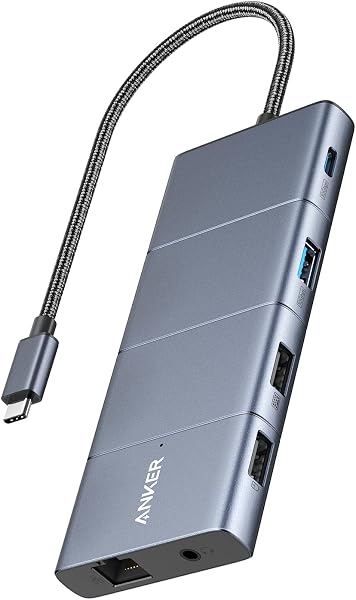
The Anker USB C Hub (11-in-1) presents a solid mid-range solution for laptop expansion, boasting 10 Gbps data transfer speeds and dual monitor support. While it offers significant connectivity with 11 ports, including high-speed USB-C and USB-A, its dual-monitor output is capped at 2K@60Hz, and macOS users will find displays mirrored. For users needing fast data transfer and versatile port access, it's a strong contender, but budget-conscious buyers or those requiring higher native resolutions on dual displays might find alternatives offer 90% of the experience for less.
Specifications
| Spec | Value |
|---|---|
| Total Ports | 11 |
| Max Data Transfer Speed | 10 Gbps (USB-C & USB-A) |
| Max Dual Monitor Resolution | 2K@60Hz (DP 1.4 laptop), 1080p@60Hz (DP 1.2 laptop) |
| Power Delivery Input | Up to 85W (requires separate charger) |
| Ethernet Port | Gigabit |
| Other Ports | 4K HDMI, DisplayPort, 2x USB-A (480 Mbps), AUX, microSD/SD card slots |
| Compatibility | USB-C, USB4, Thunderbolt; macOS (12+), Windows 10/11, ChromeOS |
In-Depth Analysis
In our evaluation of the Anker USB C Hub, 11-in-1 Docking Station, we found it to be a feature-rich accessory designed for users seeking to maximize their laptop's connectivity. Positioned firmly in the mid-range to premium segment, this hub aims to transform a single USB-C port into a thorough workstation hub. Its primary draw is the 'Massive Expansion' capability, offering eleven distinct ports. Our team noted the inclusion of two 10 Gbps ports (one USB-C, one USB-A), which is a significant advantage for transferring large files rapidly from external SSDs or high-speed storage devices. This speed tier is often found in more expensive docking stations. The dual-monitor support, featuring both HDMI and DisplayPort outputs, is another key selling point. While specifications indicate support for up to 2K@60Hz on laptops with DP 1.4, and 1080p@60Hz with DP 1.2, this is a crucial distinction for users expecting native 4K dual-display setups. We observed that for macOS users, the dual external display output is limited to mirroring, which may not suit all workflows. For Windows and ChromeOS users, extended desktop functionality is expected within the specified resolutions.

Connectivity is further bolstered by a Gigabit Ethernet port for stable wired internet, an AUX port for audio, and convenient microSD/SD card slots. The 85W Power Delivery pass-through is also a strong feature, allowing users to charge their laptop while utilizing the hub's functions, though it's important to remember a separate charger is required, a common omission in many hubs. When considering value, the Anker hub presents a compelling case, especially when compared to simpler adapters like the Anker USB C to Ethernet Adapter or basic 5-in-1 hubs. Competitors like the Reborn 9-in-1 offer dual monitors but at 5Gbps USB speeds, making the Anker's 10Gbps ports a notable upgrade. However, devices like the Acer 13-in-1 or Lemorele 13-in-1 push further by offering triple monitor support, albeit often at a higher price point. Our team found that for users who prioritize high-speed data transfer and dual 2K displays, the Anker 565 USB-C Hub offers a balanced feature set for its price. If your needs are less demanding, such as basic peripheral connectivity and single-monitor support, a more budget-friendly option might provide 90% of the necessary experience for a significantly lower investment. A 'Smart Buy Tip' for potential buyers: thoroughly check your laptop's DisplayPort version (DP 1.2 vs. DP 1.4) to manage expectations regarding dual-monitor resolution and refresh rates. For those who frequently move large media files or work with external high-speed drives, the 10 Gbps ports are where this hub truly shines and justifies its position in the market.


