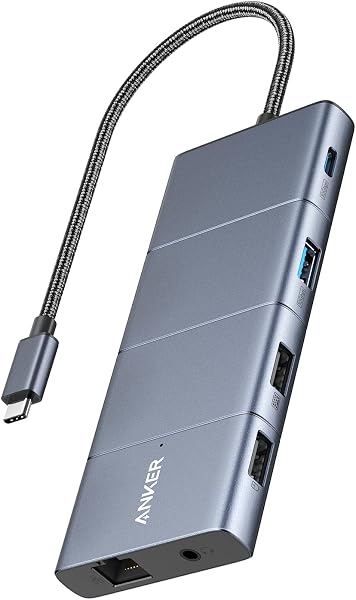
The Anker Nano Laptop Docking Station offers a versatile 13-in-1 design with a detachable hub.
- Features a 13-in-1 desktop docking station with a detachable 6-in-1 portable hub that snaps off for on-the-go use.
- Due to macOS limitation, all external monitors mirror the same screen.
macOS users requiring extended desktop functionality across multiple external displays may find this dock unsuitable. ample ports, and 100W laptop charging, though macOS users should note its mirrored display limitation.

Who it suits
Works well if
- Users needing a flexible docking solution for both desk and travel setups.
- Professionals requiring extensive port connectivity, including multiple display outputs and high-speed data transfer.
- Users who need to charge their laptop while using peripherals.
Think twice if
- macOS users who require extended desktop mode across multiple external displays.
The numbers that matter
- Detachable 2-in-1 design for desk and travel use.
- Supports triple display output with up to 4K@60Hz on a single display.
- Includes 13 ports: 2x USB-C (10Gbps), 3x USB-A, 2x HDMI, 1x DisplayPort, Gigabit Ethernet, audio, SD/TF slots.
- Delivers up to 100W Power Delivery to charge laptops.
What the evidence says
| Item | Value |
|---|---|
| Detachable Design | Detachable 2-in-1 Design for Desk & Travel |
| Triple Display Support | Supports up to 4K@60Hz (single display) or dual 2K@60Hz (dual displays) or triple 1080P@60hz (triple display). |
| Port Count | 13-in-1 (2× USB C Data, 3× USB-A, 2× HDMI, 1× DisplayPort, 1× Gigabit Ethernet, 1× 3.5mm audio, SD/TF card slots) |
| Laptop Charging | 100W Power Delivery |
| Data Transfer Speed | 10Gbps (USB C Data port) |
| Warranty | 18 months |
| Dimensions | 3.74 inches x 1.57 inches x 5.51 inches |
| macOS Display Behavior | External monitors mirror the same screen |
| Downstream Port Charging | Support data transfer only, do not support device charging |
| External Display Support (Actual) | Triple displays |
| Power Delivery (to laptop) | 100 W |
Where buyers hesitate
What is the main benefit of the detachable design?
The detachable hub offers dual functionality as a portable travel solution and a full desktop dock. The Anker Nano Laptop Docking Station features a 13-in-1 desktop setup that includes a detachable 6-in-1 portable hub. This design allows users to snap off the smaller hub for on-the-go use, effectively providing two devices in one and covering both home office and mobile work needs without purchasing separate units.
Due to macOS limitation, all external monitors mirror the same screen.
macOS users may experience mirrored external displays, limiting extended desktop functionality. A significant limitation for macOS users is that all external monitors connected to the Anker Nano Laptop Docking Station will mirror the same screen, preventing the use of an extended desktop setup across multiple displays. This is a known macOS limitation affecting this product.
anker docking station vs dell docking station
This Anker dock offers a detachable hub, while Dell docks are often integrated solutions. While this Anker Nano Laptop Docking Station provides a unique detachable 2-in-1 design for versatility, other brands like Dell offer integrated docking stations. Dell docks are typically designed to complement Dell laptops and may offer different port configurations or specific compatibility features. Shoppers comparing options should consider the Anker's flexibility against the potentially more integrated or brand-specific features of a Dell dock.
Can a docking station also charge my laptop?
This dock delivers up to 100W Power Delivery to charge your laptop. Yes, the Anker Nano Laptop Docking Station is designed to deliver up to 100W Power Delivery to charge your laptop while running connected peripherals. The listing specifies it includes a 140W power adapter to ensure stable performance under full load.
Why we judge it this way
The Anker Nano Laptop Docking Station presents a compelling 13-in-1 solution with its standout detachable 2-in-1 design, which allows users to switch between a full desktop setup and a portable hub. This flexibility is a primary draw, offering convenience for those who work from multiple locations, as it replaces two devices in one package, covering both home office and mobile work needs. The listing highlights a robust selection of ports, including two HDMI, one DisplayPort, multiple USB-A and USB-C ports (one at 10Gbps), Gigabit Ethernet, and audio/card slots, catering to a wide array of peripheral needs. Furthermore, it supports up to 100W Power Delivery, ensuring laptops can be charged while connected, and includes a 140W power adapter for stable performance.
However, a significant limitation surfaces for macOS users. Community reports indicate that due to a product-specific limitation, all external monitors connected to this dock will mirror the same screen, preventing the extended desktop functionality that many users rely on. This contrasts with the listing's claim of supporting triple display setups, which is accurate for Windows but not for macOS in extended mode. This means users who depend on multiple independent displays for their workflow on a Mac may find this dock unsuitable and need to look elsewhere.
Another point of consideration from community feedback is that the downstream USB-A and USB-C ports, while supporting data transfer, do not provide charging for connected devices. This detail, not explicitly stated in the listing's feature set, means users cannot rely on these ports for powering up accessories like phones or external drives. The dock itself is powered by a 140W adapter, ensuring stable performance under load, and it comes with an 18-month warranty.
Despite the macOS display limitation, the Anker Nano Laptop Docking Station remains a versatile option for Windows users or those who only need mirrored displays on macOS. Its detachable hub, extensive port selection, and laptop charging capability are strong selling points. Shoppers must weigh the product's flexibility and port density against its specific display limitations for macOS. The product is also praised for its reliability by some community members, reporting no device recognition problems or random disconnects.
The strongest objection we found
Due to macOS limitation, all external monitors mirror the same screen.
What this page does not answer
- How does the Anker Nano Laptop Docking Station compare to other 13-in-1 docks?
- What are the best docking stations for MacBooks?
- UGREEN USB C Hub 5 in 1 Multiport USB Adapter
- Anker USB C Hub, 5-in-1 USBC to HDMI Splitter
- Plugable Thunderbolt 4 Dock with 100W Charging
How this analysis was built
This analysis was conducted by reviewing the product listing's specifications and features, alongside community forum discussions. We have cross-referenced user-reported issues and praises with the product's advertised capabilities. Direct buyer reviews for this specific model were not available, so broader category insights and community feedback were prioritized.
Information regarding user sentiment and specific complaints about display behavior on macOS originates from community forums and is not derived from direct buyer reviews of this specific product model.
Information is gathered from publicly available sources.
Sources and verification
Everything on this page traces back to the listing published for this product on Amazon.com. At the analysis date that listing showed 4.2 stars across 167 reviews. The write-up works from 14 verified data points, drawn from listings of comparable products in this category. Analysis generated on 2026-10-31.