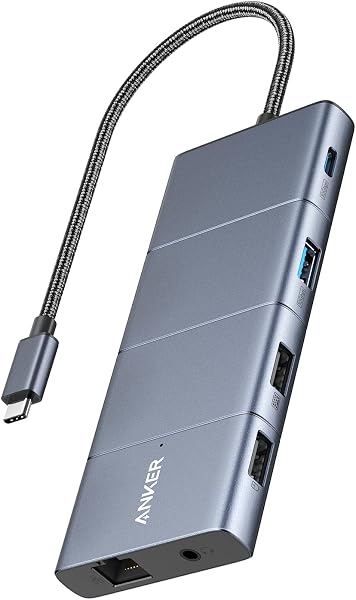
The listing for the Anker 675 USB-C Docking Station does not specify if drivers are required for its use.
While the listing is silent, other docking stations in the category have been reported to require driver installations, especially for macOS.

Who it suits
Works well if
- Organizing a desk workspace with a monitor stand and storage underneath
- Charging laptops up to 100W and other devices via multiple ports
- Wireless charging of compatible phones
- Promoting healthier posture with a raised monitor setup
Think twice if
- Users needing to connect displays via USB-C ports, as only HDMI is supported
The numbers that matter
- 12-in-1 functionality including HDMI, USB-A/C, SD card slots, and Ethernet
- Supports one external monitor via HDMI port at 4K@60Hz resolution
- Provides up to 100W charging for a connected laptop
- Average marketplace rating of 4.1 out of 5 stars from 487 ratings
- Includes an 18-month warranty
What the evidence says
| Item | Value |
|---|---|
| 12-in-1 Docking Station and Monitor Stand | Equip your workstation with a 100W max USB-C upstream port (connect to laptop), 3 USB-A ports, 2 USB-C ports, SD/microSD card slots, a 4K HDMI port, a wireless charging pad, and an Ethernet port. |
| All-in-One Workspace Organizer | Stand your monitor on top of the docking station, and use the space underneath to store your keyboard, mouse, and other peripherals when you're not using them. |
| Display Output Limitation | This docking station only supports display via HDMI port; it does not support display via any of the USB-C ports. |
| User-Friendly Design for Posture | By raising your monitor off the desk, you'll be able to sit up straight instead of slouching—promoting a healthier posture and a more comfortable work experience. |
| Power Delivery Options | With a 100W max USB-C upstream port to charge your laptop, 2 USB-C Power Delivery ports sharing 45W, 3 USB-A ports for smaller devices, and a wireless charging pad for your phone, you have more than enough options to keep your whole workspace powered up. |
| Color | Dark Gray |
| Dimensions | 21.26 inches x 8.66 inches x 3.54 inches |
| Weight | 3.65 pounds |
| Warranty | 18 months |
| HDMI Port Issues | Hdmi ports fail or produce low quality output |
| Reliability Concerns | The Anker 675 USB-C Docking Station feels like a final prototype rather than a finished product. [.] The main problem that holds the Anker 675 back from being a genuinely useful work companion is reliability. |
Buyer reviews for this specific product were not available. Information on potential driver requirements is derived from category-level reports.
Where buyers hesitate
Do I need to install any drivers to use this dock?
The listing does not state if drivers are required for this Anker docking station. The Anker 675 USB-C Docking Station's listing is silent on driver installation. However, community discussions about similar docking stations in the category have noted the need for driver packages, particularly for macOS compatibility.
What docking stations are compatible with Dell laptops?
Compatibility with specific laptops like Dell is not detailed in this product's listing. While this Anker dock is designed for general use, specific laptop compatibility, especially for brands like Dell, is not provided in the listing. Community discussions about other docking stations have reported varying success with Dell laptops.
How many monitors does the dock support, and what is the maximum resolution supported?
This dock supports one external monitor via HDMI at a maximum resolution of 4K@60Hz. The Anker 675 USB-C Docking Station can connect to one external display through its HDMI port, supporting up to 4K resolution at a 60Hz refresh rate. It does not support display output via its USB-C ports.
How reliable is the Anker 675 USB-C Docking Station?
Concerns have been raised about the reliability and overall finish of the Anker 675 docking station. Community discussions indicate that the Anker 675 USB-C Docking Station feels like a prototype and suffers from reliability issues, which significantly hinders its usability as a daily work companion.
Why we judge it this way
The Anker 675 USB-C Docking Station presents itself as a versatile 12-in-1 hub and monitor stand, promising to equip workstations with ample connectivity, including a 4K HDMI port, multiple USB ports, and wireless charging. It's designed to organize desk space and promote better posture. With a respectable marketplace rating of 4.1 out of 5 stars from 487 ratings, the listing suggests a satisfactory user experience.
However, community feedback introduces significant concerns that temper this optimistic view. A notable complaint indicates that 'HDMI ports fail or produce low quality output', an issue echoed by multiple users. This directly contradicts the listing's feature of a 4K HDMI port and raises questions about the display output's dependability. The 4K@60Hz specification from usage data is undermined by these reports.
Further undermining confidence, community statements describe the Anker 675 as feeling like a 'final prototype rather than a finished product' and highlight 'reliability' as its main problem. This sentiment, coupled with the specific HDMI port issues, suggests that while the product offers many features, its execution may fall short for consistent daily use.
Despite these drawbacks, the dock does offer robust charging capabilities, with an upstream USB-C port supporting up to 100W and additional Power Delivery ports, and includes a convenient wireless charging pad. The product's physical attributes, such as its weight of 3.65 pounds and dimensions, are listed, and it comes with an 18-month warranty, providing some measure of assurance. Nevertheless, the potential for display issues and general reliability problems means prospective buyers should weigh these concerns carefully against the advertised convenience.
The strongest objection we found
Hdmi ports fail or produce low quality output
What this page does not answer
- What is the best docking station for dual monitors?
- How does the Anker 675 compare to Dell WD19S docking stations?
- What are the top docking stations for MacBooks?
- UGREEN 9-in-1 USB-C Docking Station wins on dual-screen supporting
How this analysis was built
This analysis is based on the product listing's specifications and features, alongside community forum discussions and reports from other products within the same category.
Information regarding potential driver requirements is derived from reports about other products in the Docking Stations category, as this product's listing does not specify.
Sources and verification
Everything on this page traces back to the listing published for this product on Amazon.com. At the analysis date that listing showed 4.1 stars across 487 reviews. The write-up works from 14 verified data points, drawn from listings of comparable products in this category. Analysis generated on 2026-10-31.