Computer Keyboards

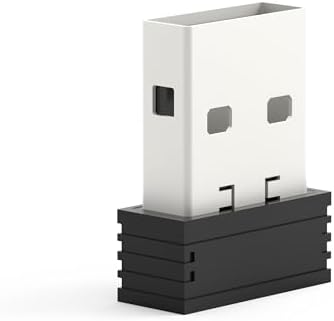
RedThunder USB Receiver for RedThunder G60, K10, K62, K84 Wireless Keyboard and Mouse
starstarstarstarstar
0.00
0 Reviews
Share
Best Entry Price
$9.99
View Dealarrow_forward
lockSecure Checkout
local_shippingFast Delivery
undoFree Returns
Limited Time Offer
$9.99
Check Price on Amazonshopping_cart
verifiedVerified Prices

As an Amazon Associate we earn from qualifying purchases.

Product Overview

Key features

Compatible Models: RedThunder G60 One-Handed Wireless Keyboard, K10 Wireless Keyboard & Mouse Combo, K62 Wireless Keyboard & Mouse Combo, K84 Wireless Keyboard & Mouse Combo, ⚠️ Important Notes Before Pairing Power Check: Ensure your keyboard and mouse have sufficient battery power. Signal Stability: Keep the device and USB receiver within 10 cm, with no obstacles between them.

Avoid Interference: Keep away from 2.4GHz interference sources (e.g., Wi-Fi routers, Bluetooth devices). Receiver Preparation: Do not plug the USB receiver into your computer until instructed in the pairing steps., Keyboard Pairing Steps For K10 / K62 / K84 Keyboard (Keep the mouse power switch OFF during this process) Slide the keyboard's power switch to ON.

Press and hold the Esc key and the K key simultaneously. The keyboard indicator light will start flashing.

Wait for 3–5 seconds, then plug the USB receiver into your computer. The pairing is complete when the indicator light stops flashing and the keyboard functions normally., For G60 One-Handed Keyboard (Keep the mouse power switch OFF during this process) Slide the keyboard's power switch to ON.

Press and hold the Esc key and the Q key simultaneously. The keyboard indicator light will start flashing.

Wait for 3–5 seconds, then plug the USB receiver into your computer. The pairing is complete when the indicator light stops flashing and the keyboard functions normally., πŸ–±οΈ Mouse Pairing Steps (Keep the keyboard power switch OFF during this process) Slide the mouse's bottom switch to LED mode.

Press and hold the mouse wheel and the right mouse button simultaneously. The mouse RGB lights will start flashing.

Wait for 3–5 seconds, then plug the USB receiver into your computer. The pairing is complete when the RGB lights stop flashing and the mouse functions normally..

Built with Weight: 0.00440924524 Pounds, Model: USB.

Key Points

What makes this product stand out

check_circleCompatible Models: RedThunder G60 One-Handed Wireless Keyboard, K10 Wireless Keyboard & Mouse Combo, K62 Wireless Keyboard & Mouse Combo, K84 Wireless Keyboard & Mouse Combo
check_circle⚠️ Important Notes Before Pairing Power Check: Ensure your keyboard and mouse have sufficient battery power. Signal Stability: Keep the device and USB receiver within 10 cm, with no obstacles between them. Avoid Interference: Keep away from 2.4GHz interference sources (e.g., Wi-Fi routers, Bluetooth devices). Receiver Preparation: Do not plug the USB receiver into your computer until instructed in the pairing steps.
check_circleKeyboard Pairing Steps For K10 / K62 / K84 Keyboard (Keep the mouse power switch OFF during this process) Slide the keyboard's power switch to ON. Press and hold the Esc key and the K key simultaneously. The keyboard indicator light will start flashing. Wait for 3–5 seconds, then plug the USB receiver into your computer. The pairing is complete when the indicator light stops flashing and the keyboard functions normally.
check_circleFor G60 One-Handed Keyboard (Keep the mouse power switch OFF during this process) Slide the keyboard's power switch to ON. Press and hold the Esc key and the Q key simultaneously. The keyboard indicator light will start flashing. Wait for 3–5 seconds, then plug the USB receiver into your computer. The pairing is complete when the indicator light stops flashing and the keyboard functions normally.
check_circleπŸ–±οΈ Mouse Pairing Steps (Keep the keyboard power switch OFF during this process) Slide the mouse's bottom switch to LED mode. Press and hold the mouse wheel and the right mouse button simultaneously. The mouse RGB lights will start flashing. Wait for 3–5 seconds, then plug the USB receiver into your computer. The pairing is complete when the RGB lights stop flashing and the mouse functions normally.
check_circleβœ… Troubleshooting Pairing failed: Repeat the pairing steps, ensuring the other device (keyboard/mouse) is powered off and the receiver is unplugged. Double-check the shortcut keys (Esc+K or Esc+Q). Intermittent connection: Move the receiver closer to the device, remove obstacles, or relocate away from Wi-Fi/Bluetooth devices. No response: Check the battery level of the keyboard/mouse and ensure the receiver is firmly plugged into a working USB port.

Main Specifications

Technical details and specifications

ModelUSB
Weight0.00440924524 Pounds
Warranty1 Year
Unit Count1
Product GroupPersonal Computer

Related Deals

Similar Products

Frequently Bought Together

mail

Never Miss a Deal

Get the best discounts and expert picks delivered to your inbox.

Join thousands of smart shoppers

RedThunder USB Receiver for RedThunder G60, K10, K62, K84 Wireless Keyboard and Mouse

$9.99
View Dealopen_in_new