Components

PVBCTCSID 8K HDMI KVM Switch 4 Computers 1 Monitor 4K144Hz EDID 4 Port KVM for 4 PC Sharing 1 Monitor and 4 USB 3.0 Devices with Controller Gray

starstarstarstarstar
0.00
0 Reviews
Share
Best Entry Price
$89.99
View Dealarrow_forward
lockSecure Checkout
local_shippingFast Delivery
undoFree Returns
Limited Time Offer
$89.99
Check Price on Amazonshopping_cart
verifiedVerified Prices

As an Amazon Associate we earn from qualifying purchases.

Product Overview

Key features

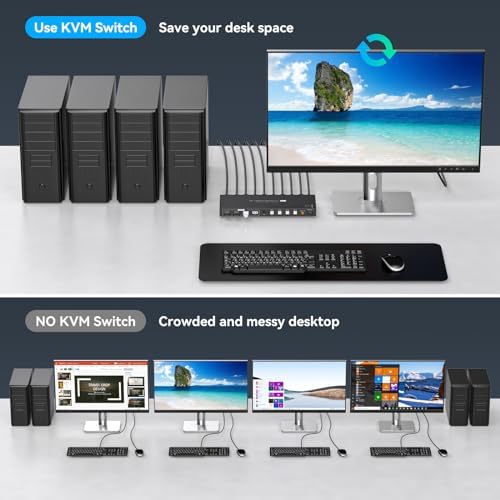
【KVM Switch 1 Monitors 4 Computers】KVM switch 4 pc 1 monitor allows 4 computers to share one display and 4 USB3.0 devices such as mouse, keyboard, and printer. With the remote control or switch button on the panel, you can easily switch between 4 computers without any complexity or delay, 【8K@60Hz Ultra-high-definition resolution】The kvm switches 4 port supports amazing resolution up to 8K@60Hz.

High-definition resolution allows you to display more detailed and realistic images with brighter and more vivid colors, it's a true visual feast. It is also backward compatible with resolutions such as 4K@60Hz, 1080P@60Hz, and 720P@60Hz.

Note: To achieve the highest resolution, ensure that the signal source、monitor、HDMI cable all support 8K@60Hz, 【Note】If you need to transmit 8K@60Hz/4K@144Hz signals, you must make sure that the computer, monitor, and transmission cable all support 4K@144Hz, otherwise the signal will be weakened (we recommend using a high refresh rate cable with a length of 1m or less, and a refresh rate of 4K@120Hz and higher).If the monitor has flickering or disconnection problems, try lowering the resolution and refresh rate of the monitor to 4K@60Hz, 【2 Switching Mode】 1. Remote Control Switching: Aim the remote control at the hdmi kvm switcher and press the button to easily switch between different computers; you can also place the KVM switcher outside of the workspace, connect the wired infrared device, aim the remote control at the infrared device, and press the button to switch. 2.

Pushbutton Switching: Simply press the white buttons from PC1 to PC4 to switch. Note: Hotkey switching is not supported, 【4 USB 3.0 Ports】The kvm switch 4 computers is equipped with 4 high-speed USB 3.0 ports, with a data transfer rate of up to 5Gbps.

The KVM switch can seamlessly share wired or wireless keyboards and mice, printers, scanners, and network cameras between 1 displays and 4 computers. Built with Dimensions: 9.33 inches x 3.3 inches x 0.82 inche

Key Points

What makes this product stand out

check_circle【KVM Switch 1 Monitors 4 Computers】KVM switch 4 pc 1 monitor allows 4 computers to share one display and 4 USB3.0 devices such as mouse, keyboard, and printer. With the remote control or switch button on the panel, you can easily switch between 4 computers without any complexity or delay
check_circle【8K@60Hz Ultra-high-definition resolution】The kvm switches 4 port supports amazing resolution up to 8K@60Hz. High-definition resolution allows you to display more detailed and realistic images with brighter and more vivid colors, it's a true visual feast. It is also backward compatible with resolutions such as 4K@60Hz, 1080P@60Hz, and 720P@60Hz. Note: To achieve the highest resolution, ensure that the signal source、monitor、HDMI cable all support 8K@60Hz
check_circle【Note】If you need to transmit 8K@60Hz/4K@144Hz signals, you must make sure that the computer, monitor, and transmission cable all support 4K@144Hz, otherwise the signal will be weakened (we recommend using a high refresh rate cable with a length of 1m or less, and a refresh rate of 4K@120Hz and higher).If the monitor has flickering or disconnection problems, try lowering the resolution and refresh rate of the monitor to 4K@60Hz
check_circle【2 Switching Mode】 1. Remote Control Switching: Aim the remote control at the hdmi kvm switcher and press the button to easily switch between different computers; you can also place the KVM switcher outside of the workspace, connect the wired infrared device, aim the remote control at the infrared device, and press the button to switch. 2. Pushbutton Switching: Simply press the white buttons from PC1 to PC4 to switch. Note: Hotkey switching is not supported
check_circle【4 USB 3.0 Ports】The kvm switch 4 computers is equipped with 4 high-speed USB 3.0 ports, with a data transfer rate of up to 5Gbps. The KVM switch can seamlessly share wired or wireless keyboards and mice, printers, scanners, and network cameras between 1 displays and 4 computers

Main Specifications

Technical details and specifications

ColorBlack
Modelsw241
Warranty1 year
Dimensions9.33 inches x 3.3 inches x 0.82 inches
Unit Count1
Part NumberSW2410317004
Product GroupPersonal Computer

Related Deals

Similar Products

Frequently Bought Together

mail

Never Miss a Deal

Get the best discounts and expert picks delivered to your inbox.

Join thousands of smart shoppers

PVBCTCSID 8K HDMI KVM Switch 4 Computers 1 Monitor 4K144Hz EDID 4 Port KVM for 4 PC Sharing 1 Monitor and 4 USB 3.0 Devices with Controller Gray

$89.99
View Dealopen_in_new