Plugable USB C Triple Display Docking Station | 100W PD, 3x HDMI (1x 4K 30Hz, 2x 1080p 60Hz), 6x USB 5Gbps Ports | Windows, macOS, ChromeOS Compatible - Enhance Productivity with Multi-Monitor Support


As an Amazon Associate we earn from qualifying purchases.
Product Overview
Key features
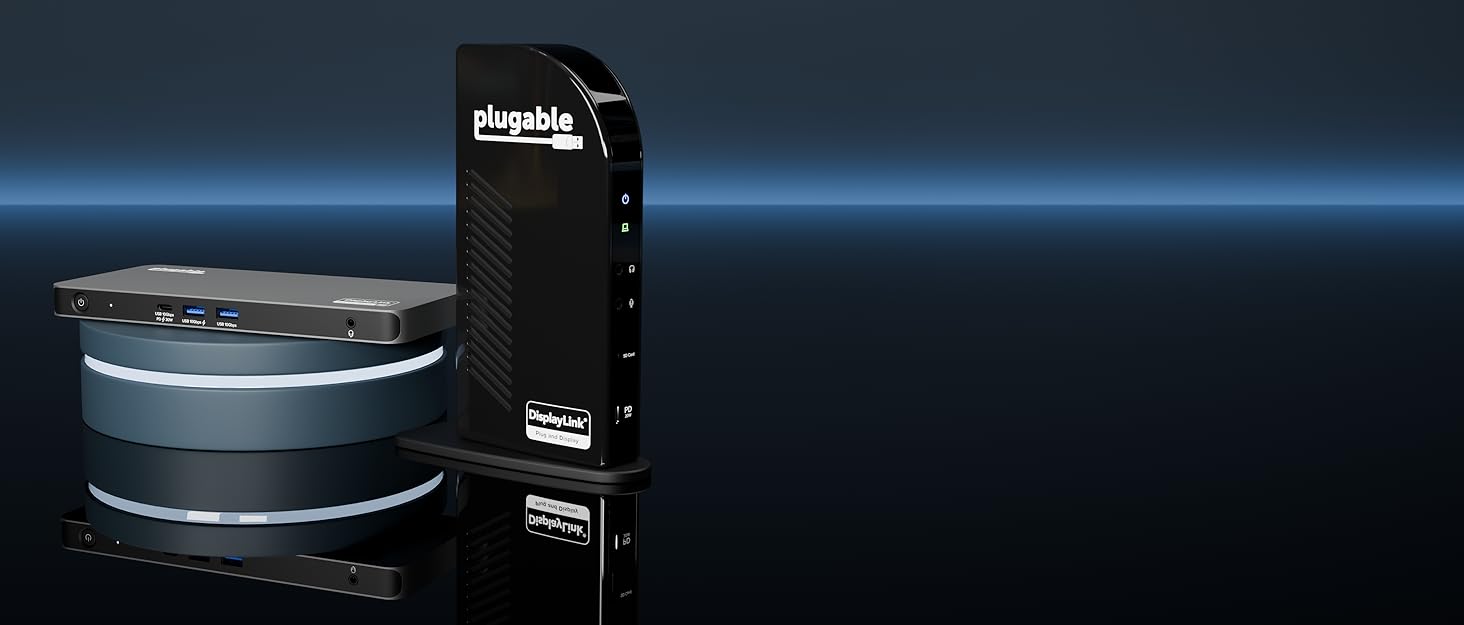
Enterprise-Grade 12-in-1 Expansion for Hybrid Teams: Designed for compatibility with USB-C, USB4, or Thunderbolt laptops on Windows, macOS, or ChromeOS environments. Enables up to 3 HDMI monitors, wired Gigabit Ethernet network access, 6x USB 3.0 peripherals, audio, and device charging.
Perfect for organizations looking to streamline IT deployments in hot-desking and managed office workspaces that demand reliable networking and easy device connectivity., Triple Display USB-C Docking Station: Maximize productivity with support for up to three extended HDMI displays (1× 4K @ 30Hz via Alt Mode, 2× 1080p @ 60Hz via DisplayLink). Bypasses native single-display limitations on platforms like Apple M1/M2/M3/Neo MacBooks.
Compatible with all newer Apple Silicon systems, including M4 and M5. Optimized for enterprise use cases such as data analysis, presentations, and conferencing, it transforms any notebook into a multi-monitor workstation for your hybrid workforce., Advanced USB-C Functionality: Integrated DisplayLink graphics technology and native USB-C video output (Alt Mode) are essential for maximizing workstation productivity, delivering full, native, high-performance multi-display support, while 100W USB-C Power Delivery ensures continuous host system charging in enterprise environments., Universal Compatibility: Engineered for seamless integration with USB Type-C, USB4, and Thunderbolt-enabled systems across macOS (11+ with driver installation), Windows, and ChromeOS (v100+). that support USB-C Alt Mode and Power Delivery.
Ideal for mixed-fleet IT environments, fully compatible with Dell XPS and Latitude, HP EliteBook and ProBook, Lenovo ThinkPad, and MacBook M series laptops, and more. Not compatible with Linux; HDCP not supported., Expert Lifetime Support: Backed by North American-based technical support and our compatibility guarantee if something doesn’t work, we’ll make it right.
Trusted by IT professionals worldwide, Plugable provides direct access
Key Points
What makes this product stand out
Main Specifications
Technical details and specifications
Deal Intelligence
Data-backed signals for this listing
- sell
3% off right now — $5.00 below the listed reference price ($164.95 → $159.95).
- star
Rated 4.3/5 — 1,100 from buyers.
Customer Ratings
What Buyers Say
Real verified customer reviews
thumb_upMost Loved
Excellent value for everyday use
Overall these work great, and are a great value. I'm an IT manager and I've purchased a few of these now for people to use as office docking stations for the MacBook Pro. Specifically these are being used with the M1 Pro…
works perfectly!
I have about 8 different adapters and hubs I've bought for my HP Spectre 360, which, when I bought it in 2019, was a trendsetter for having very few connection points (one USB 2.0 and 2 USB-Cs - come on!!!!). I need thre…
From the Brand


Expert Analysis
“No reported issues with Android 12 updates.”
Pros
- check_circleEnterprise-grade 12-in-1 expansion for hybrid teams.
- check_circleSupports up to three HDMI displays for multi-monitor workstations.
- check_circle100W USB-C Power Delivery for continuous host system charging.
- check_circleUniversal compatibility across Windows, macOS, and ChromeOS systems.
- check_circleRecommended for most shoppers due to functional ports, quick data transfer, and space-saving design.
Cons
- cancelRandom disconnects or screen freezing reported by users.
- cancelOne HDMI port (Alt Mode) may not work with all laptops, requiring careful compatibility checks.
- cancelDisplayLink compression limits HDCP streaming, unsuitable for video editing.
- cancelNot compatible with Linux.
Frequently Asked Questions
What docking stations are compatible with Dell laptops?expand_more
Does DisplayLink technology affect performance?expand_more
How much power does the dock deliver to the laptop?expand_more
Is it compatible with Apple M-series MacBooks?expand_more
How many watts of Power Delivery do I need for my laptop?expand_more
Are there any reported issues with random disconnects?expand_more
Does this dock support HDCP for streaming?expand_more
Does every docking station work with every laptop?expand_more
In-Depth Review
No specific issues related to Android 12 updates were found.
Users primarily report compatibility with Windows, macOS, and ChromeOS, with no mention of Android compatibility or issues.
Who it suits
The numbers that matter
What the evidence says
| Item | Value |
|---|---|
| Display Output | up to three extended HDMI displays (1× 4K @ 30Hz via Alt Mode, 2× 1080p @ 60Hz via DisplayLink) |
| Power Delivery | 100W USB-C Power Delivery |
| USB Ports | 6x USB 3.0 peripherals |
| Operating Systems | Windows, macOS, ChromeOS |
| Dimensions | 7.9 x 3.3 x 1.2 inches |
| Weight | 0.73193470984 Pounds |
| Random Disconnects | The docking station randomly disconnects from three screens and then reconnects, or freezes two screens. |
| Linux Compatibility | Not compatible with Linux |
| HDCP Support | HDCP not supported |
| DisplayLink Compression | limits HDCP streaming (fine for productivity but not for video editing) |
Pros & Cons
Where buyers hesitate
This dock is listed as compatible with Dell XPS and Latitude laptops. The listing specifically mentions compatibility with Dell XPS and Latitude models, engineered for seamless integration with USB Type-C, USB4, and Thunderbolt-enabled systems.
DisplayLink technology enables multi-monitor support but may limit HDCP streaming. While DisplayLink enables the triple-display setup, users note it limits HDCP streaming, making it suitable for productivity but not video editing. This is typical for devices using DisplayLink for extended displays beyond native capabilities.
The dock advertises 100W Power Delivery, but some power is reserved for the dock itself. The listing states 100W USB-C Power Delivery, but category reports suggest many docking stations reserve 10-15 watts for their own operation, potentially delivering less to the laptop.
Yes, it bypasses native limitations and is compatible with Apple M1/M2/M3/M4/M5 Silicon systems. The dock is designed to bypass native single-display limitations on Apple M1/M2/M3/Neo MacBooks and is compatible with all newer Apple Silicon systems, including M4 and M5.
Why we judge it this way
The Plugable USB C Triple Display Docking Station generally earns positive feedback, reflected in its 4.3/5 star rating across 1,100 reviews. Buyers praise its value and functionality, with one reviewer calling it an 'Excellent value for everyday use'. The dock's enterprise-grade design and 12-in-1 expansion capabilities are highlighted as ideal for hybrid teams and organizations seeking streamlined IT deployments. It effectively transforms notebooks into multi-monitor workstations, supporting up to three HDMI displays, including one 4K@30Hz and two 1080p@60Hz monitors. Furthermore, its 100W USB-C Power Delivery ensures continuous laptop charging, and it boasts universal compatibility with Windows, macOS, and ChromeOS systems. Additionally, Plugable provides expert lifetime support, offering direct access to engineers for deployment assistance, troubleshooting, and lifecycle support.
However, the evidence base is not without its concerns. A significant complaint from user reports indicates that the docking station can randomly disconnect from screens and then reconnect, or even freeze two screens. This recurring issue is a potential deal-breaker for users who rely on stable, uninterrupted display output for their work. Another limitation noted by reviewers is that the first HDMI port, which uses Alt Mode, may not be compatible with all laptops, necessitating careful checks before purchase. While the listing states compatibility with various systems, specific laptop configurations might lead to one display not functioning as expected.
Further technical considerations include the use of DisplayLink graphics technology, which, while enabling multi-display support beyond native capabilities, comes with a drawback: it limits HDCP streaming. This makes the dock suitable for general productivity but not ideal for tasks like video editing or viewing protected content. Additionally, the product explicitly states it is not compatible with Linux, and while it offers 100W Power Delivery, category reports suggest that some of this power is reserved for the dock's own operation, potentially reducing the actual wattage delivered to the laptop.
Despite these limitations, the dock remains a strong contender for its intended audience. Its wide range of ports, including six USB 3.0 ports, Gigabit Ethernet, and audio connections, combined with its multi-display support and robust charging capabilities, make it a versatile solution. The product is recommended by some for its functional ports and space-saving design. For users within its compatible operating systems and without critical needs for HDCP or Linux support, it presents a solid option for enhancing productivity through expanded connectivity.
The docking station randomly disconnects from three screens and then reconnects, or freezes two screens
Frequently Asked Questions
What this page does not answer
How this analysis was built
Analysis of the product listing's specifications and features, alongside buyer reviews, community forum discussions, and usage reports. Evidence was evaluated for its scope and source, prioritizing direct product feedback. Vendor-provided specifications were cross-referenced with user-reported experiences to identify strengths and potential limitations.
Information regarding potential power reservation by the docking station itself comes from reports about other products in the docking station category.
Sources and verification
Everything on this page traces back to the listing published for this product on Amazon.com. At the analysis date that listing showed 4.3 stars across 1,100 reviews. The write-up works from 21 verified data points, drawn from buyer reviews for this product and listings of comparable products in this category. Analysis generated on 2026-10-31.
Related Deals
Similar Products
Frequently Bought Together
Never Miss a Deal
Get the best discounts and expert picks delivered to your inbox.
Join thousands of smart shoppers
