Components

Amicool External DVD Drive USB 3.0 USB C CD Burner CD/DVD +/-RW Optical Drive, Slim Portable DVD CD ROM Rewriter Writer Duplicator for Laptop Desktop PC Windows 11/10/8/7 MacBook Mac Linux OS Apple

starstarstarstarstar
4.20
11870 Reviews
Share
-15% OFF
Amicool External DVD Drive USB 3.0 USB C CD Burner CD/DVD +/-RW Optical Drive, Slim Portable DVD CD ROM Rewriter Writer Duplicator for Laptop Desktop PC Windows 11/10/8/7 MacBook Mac Linux OS Apple - 1
Amicool External DVD Drive USB 3.0 USB C CD Burner CD/DVD +/-RW Optical Drive, Slim Portable DVD CD ROM Rewriter Writer Duplicator for Laptop Desktop PC Windows 11/10/8/7 MacBook Mac Linux OS Apple - 2
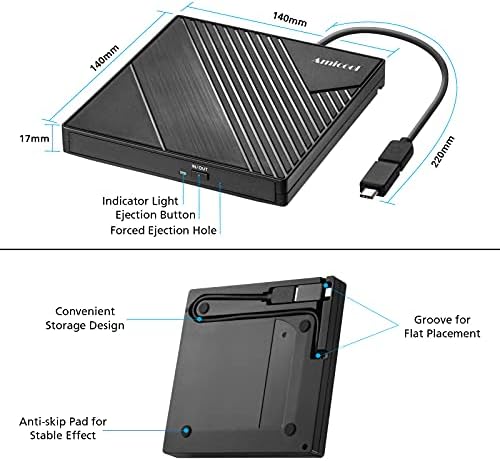
Amicool External DVD Drive USB 3.0 USB C CD Burner CD/DVD +/-RW Optical Drive, Slim Portable DVD CD ROM Rewriter Writer Duplicator for Laptop Desktop PC Windows 11/10/8/7 MacBook Mac Linux OS Apple - 3
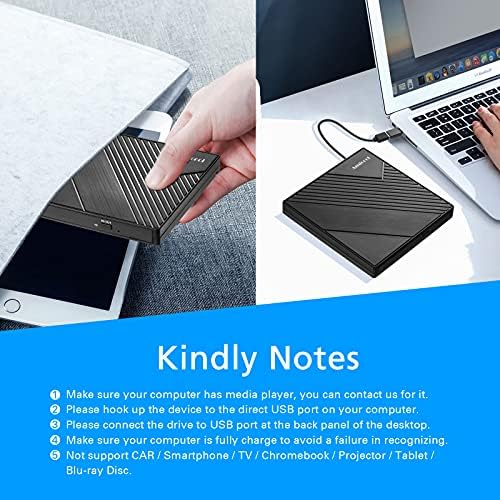
Amicool External DVD Drive USB 3.0 USB C CD Burner CD/DVD +/-RW Optical Drive, Slim Portable DVD CD ROM Rewriter Writer Duplicator for Laptop Desktop PC Windows 11/10/8/7 MacBook Mac Linux OS Apple - 4
Amicool External DVD Drive USB 3.0 USB C CD Burner CD/DVD +/-RW Optical Drive, Slim Portable DVD CD ROM Rewriter Writer Duplicator for Laptop Desktop PC Windows 11/10/8/7 MacBook Mac Linux OS Apple - 5
GemScoreℱverifiedHigh Confidence
7.6/10
Recommended
starstarstarstarstar
4.2(11870)
local_fire_departmentlocal_fire_departmentlocal_fire_departmentlocal_fire_departmentlocal_fire_department
Best Entry Price
$20.39$23.99
star4.20Based on 11870 reviews
View Dealarrow_forward
timerDeal ends in--:--:--
lockSecure Checkout
local_shippingFast Delivery
undoFree Returns
Style· star-color
checkstar-colorUltra-Slim
Limited Time Offer
$20.39
star4.20Based on 11870 reviews
Check Price on Amazonshopping_cart
verifiedVerified Prices

As an Amazon Associate we earn from qualifying purchases.

Product Overview

Key features

【PLUG & PLAY – EASY CONNECTION】 Simply connect the Amicool External DVD Drive to your computer’s USB or Type-C port, and it will usually be detected right away without the need for extra drivers. For stable operation and sufficient power, we recommend connecting it directly to a USB port on your computer (for desktops, use a rear motherboard port) and avoiding USB hubs or extension cables.

This user-friendly design ensures quick setup for both beginners and professionals., 【FAST & STABLE DATA TRANSMISSION】 Featuring dual interfaces (USB 3.0 and Type-C), this optical drive supports data transfer speeds up to 5Gbps. To ensure a reliable connection, please connect it directly to your computer.

The drive supports multiple disc formats such as DVD+R, DVD-R, CD-R, and CD-RW. Please note: It does NOT support DVD-RAM, Blu-ray (BD) discs, or certain proprietary formats.

Maximum DVD read speed is 8x, and maximum CD read/write speed is 24x., 【UNIVERSAL COMPATIBILITY】 Compatible with Windows 11 / 10 / 8.1 / 7, Linux, and all macOS (Intel & Apple Silicon) for MacBook Air/Pro, iMac, Mac mini; NOT for iPad/iPhone/Apple TV/ChromeOS; for Mac, insert disc FIRST, connect directly to USB port (use a POWERED USB‑C hub for M1/M2/M3 to avoid insufficient power), and open media with VLC Player (Apple DVD Player not supported). Works with most computers from brands like Apple, Dell, HP, Lenovo, ASUS, Acer, and Samsung. 👉 Important: Designed specifically for computers.

It is NOT compatible with TVs, tablets, game consoles (e.g., PlayStation, Xbox), car stereos, or standalone Blu-ray players., 【SLIM & PORTABLE DESIGN – BUILT-IN CABLE, READY TO GO】With an integrated cable design, slim body, and stylish matte finish, this lightweight CD/DVD drive is both durable and portable. Easily slip it into your laptop bag or backpack and use it anytime, anywhere—perfect for business, travel, or home use, 【MULTIFUNCTIONAL & RELIABLE OPERATION】 Equipped with intelligent error correction and an

Key Points

What makes this product stand out

check_circle【PLUG & PLAY – EASY CONNECTION】 Simply connect the Amicool External DVD Drive to your computer’s USB or Type-C port, and it will usually be detected right away without the need for extra drivers. For stable operation and sufficient power, we recommend connecting it directly to a USB port on your computer (for desktops, use a rear motherboard port) and avoiding USB hubs or extension cables. This user-friendly design ensures quick setup for both beginners and professionals.
check_circle【FAST & STABLE DATA TRANSMISSION】 Featuring dual interfaces (USB 3.0 and Type-C), this optical drive supports data transfer speeds up to 5Gbps. To ensure a reliable connection, please connect it directly to your computer. The drive supports multiple disc formats such as DVD+R, DVD-R, CD-R, and CD-RW. Please note: It does NOT support DVD-RAM, Blu-ray (BD) discs, or certain proprietary formats. Maximum DVD read speed is 8x, and maximum CD read/write speed is 24x.
check_circle【UNIVERSAL COMPATIBILITY】 Compatible with Windows 11 / 10 / 8.1 / 7, Linux, and all macOS (Intel & Apple Silicon) for MacBook Air/Pro, iMac, Mac mini; NOT for iPad/iPhone/Apple TV/ChromeOS; for Mac, insert disc FIRST, connect directly to USB port (use a POWERED USB‑C hub for M1/M2/M3 to avoid insufficient power), and open media with VLC Player (Apple DVD Player not supported). Works with most computers from brands like Apple, Dell, HP, Lenovo, ASUS, Acer, and Samsung. 👉 Important: Designed specifically for computers. It is NOT compatible with TVs, tablets, game consoles (e.g., PlayStation, Xbox), car stereos, or standalone Blu-ray players.
check_circle【SLIM & PORTABLE DESIGN – BUILT-IN CABLE, READY TO GO】With an integrated cable design, slim body, and stylish matte finish, this lightweight CD/DVD drive is both durable and portable. Easily slip it into your laptop bag or backpack and use it anytime, anywhere—perfect for business, travel, or home use
check_circle【MULTIFUNCTIONAL & RELIABLE OPERATION】 Equipped with intelligent error correction and anti-shock technology, this drive supports reading, writing, and burning discs. If the drive is not recognized or a disc cannot be read, try restarting your computer or testing with a different, standard CD-R or DVD-R disc. The pop-up button and built-in cable design offer convenience and portability. For desktop PCs, connecting to a rear USB port is recommended for optimal power and performance.
check_circle【IMPORTANT RECOGNITION TIP – PLEASE READ BEFORE USE】 If the drive’s indicator light is on but no icon appears on your laptop, this is normally caused by insufficient USB power. Please use a direct USB port on your computer, keep your laptop plugged into power, avoid hubs or extension cables, and try a different USB port.

Main Specifications

Technical details and specifications

SizeStandard
ColorBLACK
ModelA11
BindingPersonal Computers
Warranty1
Dimensions5.511811018 Inches x 5.511811018 Inches x 0.6692913379 inches
Unit Count1
Part Number1
Release Date2019-11-30T00:00:01Z
Product GroupElectronics

Expert Analysis

7.5/10Solid Buy

“While the Amicool External DVD Drive offers convenient plug-and-play functionality and broad OS compatibility at an attractive price point, our analysis indicates it's a budget option with notable dra”

Pros

  • check_circlePlug-and-play simplicity for quick setup across Windows, macOS, and Linux without extra drivers.
  • check_circleDual USB 3.0 and Type-C interfaces ensure compatibility with both older and modern laptops and desktops.
  • check_circleSlim, portable design with an integrated cable makes it easy to carry and use on the go.
  • check_circleOffers a cost-effective solution for computers that lack an internal optical drive.

Cons

  • cancelSeveral users report DVD region locking issues, preventing playback of discs from different geographical areas without manual adjustment.
  • cancelOccasional connection interruptions and disc recognition problems are noted, with some users experiencing the drive drawer failing to open or the device disappearing from system reports.
  • cancelDoes not support DVD-RAM or Blu-ray discs, limiting its utility for certain media types.
  • cancelSome Mac users have encountered issues where the drive disconnects or files appear too large when attempting to burn discs.

Frequently Asked Questions

Why is my Amicool external DVD drive not recognized by my computer?expand_more
If your Amicool drive isn't recognized, first try connecting it directly to a USB port on your computer, preferably a rear motherboard port for desktops, and avoid USB hubs or extension cables. Ensure the USB cable is securely plugged in at both ends. Sometimes, a simple computer restart can resolve temporary detection issues. If the problem persists, check your device manager for any driver conflicts or consider updating your system's USB drivers.
Can I play Blu-ray discs with the Amicool external DVD drive?expand_more
No, this Amicool external DVD drive is not designed to play Blu-ray discs. It only supports standard CD and DVD formats, including CD-R, CD-RW, DVD-R, and DVD+R. Attempting to insert a Blu-ray disc will likely result in the drive not recognizing it or an error message.
How do I fix DVD region code issues with this drive?expand_more
DVD region codes are a form of copy protection. Your Amicool drive may have a default region set, and you can typically change it through your operating system's media player software or the drive's properties in Device Manager. Most players allow a limited number of region changes (often 5), so choose carefully. If you encounter persistent issues, consult your media player's help documentation for specific instructions on adjusting region settings.
Is this Amicool drive compatible with macOS Big Sur or newer versions?expand_more
Yes, the Amicool external DVD drive is advertised as compatible with macOS. While it generally works with newer versions like Big Sur and later, some users have reported specific issues, such as the drive disappearing when a disc is inserted. Ensuring your macOS is updated and trying different USB ports can sometimes resolve these Mac-specific quirks.
What is the difference between USB 3.0 and USB Type-C on this drive?expand_more
USB 3.0 (often using the Type-A connector) and USB Type-C are different types of USB connections. USB 3.0 specifies the speed and data transfer protocol (up to 5Gbps), while Type-C refers to the physical connector shape, which is reversible and smaller. This drive features both: a standard USB 3.0 port for older devices and a modern USB Type-C port for newer laptops, both supporting the same high-speed data transfer.
Why does the Amicool drive make strange noises or disconnects?expand_more
Strange noises can sometimes indicate a disc that is unbalanced, scratched, or not seated correctly, or a mechanical issue within the drive. Disconnections, as reported by some users, might stem from insufficient power delivery, especially if connected via a hub or extension cable, or potential driver conflicts. Ensuring a direct connection to a stable power source and restarting your computer are initial troubleshooting steps.

Related Deals

Similar Products

Frequently Bought Together

mail

Never Miss a Deal

Get the best discounts and expert picks delivered to your inbox.

Join thousands of smart shoppers

Amicool External DVD Drive USB 3.0 USB C CD Burner CD/DVD +/-RW Optical Drive, Slim Portable DVD CD ROM Rewriter Writer Duplicator for Laptop Desktop PC Windows 11/10/8/7 MacBook Mac Linux OS Apple

$20.39$23.99
View Dealopen_in_new