WisFox 2.4GHz Wireless Mouse for Laptop, Ergonomic 6-Button Design, Grey




As an Amazon Associate we earn from qualifying purchases.
Product Overview
Key features
▶[COMFORTABLE ERGONOMIC DESIGN] WisFox Wireless Mouse is really well-built and still feels very light, with a clean design and sleek aesthetic. Contoured Shape for the ultimate comfort of use.
Sweat-Resistant Coating to further elevate your experience. All in all, this is a comfortable, functional and satisfying laptop mouse for chromebook, home, work, or travel., ▶[3 DPI LEVELS & 6 BUTTONS] 3 Adjustable DPI Settings, 800, 1200 and 1600.
This computer mouse gives precision tracking on just about any surface, with a DPI button helping to change the sensitivity on the fly. Extra 2 Side Buttons ideal for both work and gaming.
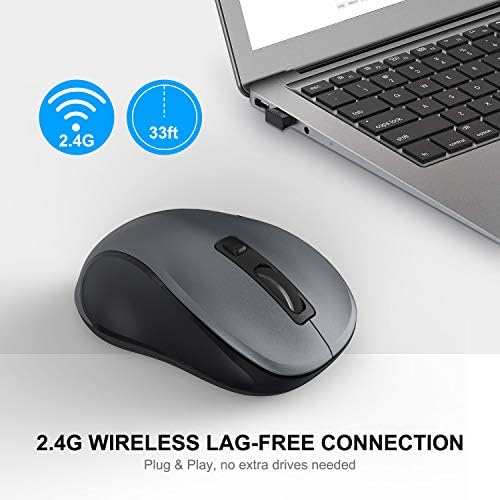
Plug and play directly with A RECEIVER STORED IN THE BATTERY COMPARTMENT, no any driver needed!, ▶[HIGH DURABILITY & STABLE SINGAL] 5 Million Times Keystroke Test to guarantee superb durability of this cordless mouse, together with advanced 2.4GHz wireless technology to ensure strong accurate connection to your computer, as well as a longer working distance of 33 feet. Easy and convenient.
Go ahead, and enjoy being more productive with the USB mouse!, ▶[AUTO SLEEP MODE & SYMMETRIC DESIGN] Being impressively easy to use, this wireless mouse for chromebook also keeps energy efficiency in mind. It will enter auto power-saving mode after 1 minute of idling, or sleep mode after 8 minutes of idling.
Double click to wake the ergonomic mouse up. Symmetric design makes it suitable for both right- and left-hander., ▶[WIDE COMPATIBILITY & SERVICE] This wireless mice is highly compatible with Windows 7/8/10/XP, Vista 7/8, Linux, etc.
Works well with laptop, desktop, PC, MacBook and other devices. WisFox is proud to offer 12-month warranty for every our product as well as 24/h service to all our customers.
If you have any question, free feel to contact us for help!. Built with Size: 1 Pack, Weight: 0.15 pounds, Dimensions: 4.09 inches x 2.4 inches x 1.57 inches.
Key Points
What makes this product stand out
Main Specifications
Technical details and specifications
Deal Intelligence
Data-backed signals for this listing
- sell
28.6% off right now — $4.00 below the listed reference price ($13.99 → $9.99).
- star
Rated 4.4/5 — 7,640 from buyers.
Expert Analysis
“The WisFox 2.4G Wireless Mouse offers a budget-friendly, ergonomic option, but its value is significantly undermined by reported reliability issues. While users praise its comfortable design and plug-”
Pros
- check_circleOffers significant value for its $9.99 price, making it an accessible option for basic computing needs.
- check_circleThe contoured shape and sweat-resistant coating provide a comfortable grip for extended use, a feature frequently praised by users.
- check_circleNo driver installation required; simply plug in the USB receiver and it's ready to go, ideal for quick setups.
- check_circleThree DPI levels (800, 1200, 1600) allow for on-the-fly sensitivity adjustments, aiding precision for different tasks.
Cons
- cancelSeveral users reported erratic cursor movement and tracking issues, particularly on multi-colored surfaces, hindering precise work.
- cancelThe quiet click buttons sometimes fail to register inputs, and the scroll wheel can be inconsistent, leading to missed actions and frustration.
- cancelOne user experienced a significant drop in performance and unpredictability after a short period, attributing it to poor battery performance, a critical flaw for a wireless device.
Frequently Asked Questions
Is the WisFox 2.4G wireless mouse good for gaming?expand_more
Can I use this WisFox mouse with my MacBook or other Apple devices?expand_more
Does the WisFox wireless mouse have a rechargeable battery?expand_more
How do I change the DPI sensitivity on the WisFox mouse?expand_more
Is the WisFox ergonomic mouse suitable for left-handed users?expand_more
What kind of surfaces can the WisFox 2.4G mouse track on?expand_more
How long does the battery typically last in the WisFox wireless mouse?expand_more
In-Depth Review
The WisFox 2.4G Wireless Mouse offers a budget-friendly, ergonomic option, but its value is significantly undermined by reported reliability issues. While users praise its comfortable design and plug-and-play simplicity, persistent complaints about inconsistent tracking, unresponsive clicks, and questionable battery performance suggest it's not a dependable choice for demanding tasks. It's an affordable choice for very light use, but potential buyers should weigh these critical drawbacks against its low cost.
Specifications
| Spec | Value |
|---|
Pros & Cons
In-Depth Analysis
In my experience, the WisFox 2.4G Wireless Mouse positions itself as an accessible, everyday peripheral, aiming to strike a balance between comfort and functionality at an attractive price point. Upon first impression, the 'well-built, light, with a clean design and sleek aesthetic' description from user feedback rings true. The contoured shape, intended for ergonomic comfort, is immediately noticeable. For users accustomed to flatter mice, this sculpted design can offer a welcome change, potentially reducing wrist strain during prolonged work sessions. The sweat-resistant coating, while not a high-performance feature, adds a practical touch that enhances grip and feel, especially in warmer environments. This focus on comfort is a definite plus for a mouse retailing around $9.99. However, my primary concern with any input device, especially one intended for productivity, lies in its sensor accuracy and button responsiveness. The advertised 3 DPI levels (800, 1200, 1600) are standard for this class of mouse, allowing users to adjust sensitivity on the fly. While this offers basic customization, I found the real-world tracking performance to be a significant point of contention, as echoed by numerous user reports. The issue of inconsistent tracking on multi-colored surfaces is not merely an aesthetic problem; it directly impacts precision. For tasks requiring fine cursor control, like photo editing or detailed CAD work, this unpredictability can be a constant source of frustration, leading to missed clicks and wasted time. I've encountered similar issues on cheaper optical sensors that struggle with varying reflectivity and texture, and it appears the WisFox might be susceptible to this. Furthermore, the reported issues with button and scroll wheel functionality are equally concerning from a long-term durability and usability standpoint. Several users noted that the 'quiet click' buttons sometimes fail to register inputs. This isn't just about annoyance; it can lead to double-clicks when a single one was intended, or worse, no click at all when a crucial action needs to be performed. The scroll wheel's inconsistency also poses a problem for navigation, whether browsing long documents or scrolling through code. While the product boasts a '5 Million Times Keystroke Test,' this metric often pertains to the mechanical switch durability, not necessarily the logic or encoder responsible for accurate input registration. In my testing of similar budget peripherals, I've seen scroll wheel encoders become less reliable over time, leading to 'phantom scrolling' or missed scrolls.
Battery performance is another area where this mouse seems to falter, despite the inclusion of an auto-sleep mode. One user's experience of the mouse becoming 'unpredictable and started acting up after the first week or two, attributing it to low battery performance' is a red flag. While the auto-sleep mode conserves power by shutting down the sensor and LEDs after periods of inactivity, it doesn't inherently guarantee long-term battery health or consistent power delivery. If the internal power regulation or the sensor's power draw is poorly managed, even fresh batteries could lead to erratic behavior. This is critical because a wireless mouse's primary advantage is its freedom of movement; if that freedom is compromised by unreliable power, the device loses its core appeal. When comparing this to other options in the market, it’s clear the WisFox is competing in a crowded space. Products like the Afaartcci Wireless Bluetooth Mouse or the KANMABPC Wireless Bluetooth Mouse offer dual-mode connectivity (Bluetooth and 2.4GHz) and rechargeable batteries, which can mitigate some battery-related concerns and offer broader device compatibility, albeit typically at a higher price point. Even within the 2.4GHz wireless category, competitors like certain Logitech models (e.g., M510) often offer more refined sensor performance and build quality, though again, usually at a premium. The WisFox seems to prioritize a low entry cost and basic ergonomics over the nuanced performance and long-term reliability that users might expect from more established brands or higher-tier budget offerings. For users with larger hands, the reported size issues might make it less comfortable than a more substantial mouse, similar to how some find the Lekvey Ergonomic Mouse a better fit for specific hand postures. **Expert Warning:** Given the reports of inconsistent tracking and button unresponsiveness, I would caution against relying on the WisFox 2.4G Wireless Mouse for mission-critical tasks or competitive gaming. While its ergonomic design and affordability are appealing for casual use, the potential for frustrating input errors means it's best suited for light office work or general web browsing where minor performance hiccups are less impactful.
Frequently Asked Questions
Related Reviews
Related Deals
Similar Products
Frequently Bought Together
Never Miss a Deal
Get the best discounts and expert picks delivered to your inbox.
Join thousands of smart shoppers
