Z-Edge 32-Inch 240Hz Monitor: Massive Speed, Fuzzy Pixels — Is It Worth The Compromise?

Z-Edge 32 Inch Curved Gaming Monitor 240Hz 1ms MPRT Full HD 16:9 Curved Screen Frameless LED Monitor, Ultra-Thin Bezel, FreeSync, DisplayPort & HDMI, Black

Z-Edge 32 Inch Curved Gaming Monitor 240Hz 1ms MPRT Full HD 16:9 Curved Screen Frameless LED Monitor, Ultra-Thin Bezel, FreeSync, DisplayPort & HDMI, Black

★★★★★4.4 (1,310)

£191.66

£145.49

View on Amazonopen_in_new
Share
Share

"The Z-Edge 32-inch 240Hz monitor offers exceptional speed and an immersive curved display at an attractive price point, making it a compelling option for budget-conscious gamers. However, prospective buyers must weigh this against the noticeable compromise in pixel density due to its Full HD resolution on a large 32-inch panel, a concern echoed by users who also report middling HDR performance and occasional durability issues. Our team found that while it delivers on raw refresh rate, the visual"

Editor's Summary

The Verdict

Solid Buy

"The Z-Edge 32-inch 240Hz monitor offers exceptional speed and an immersive curved display at an attractive price point, making it a compelling option for budget-conscious gamers. However, prospective "

Pros

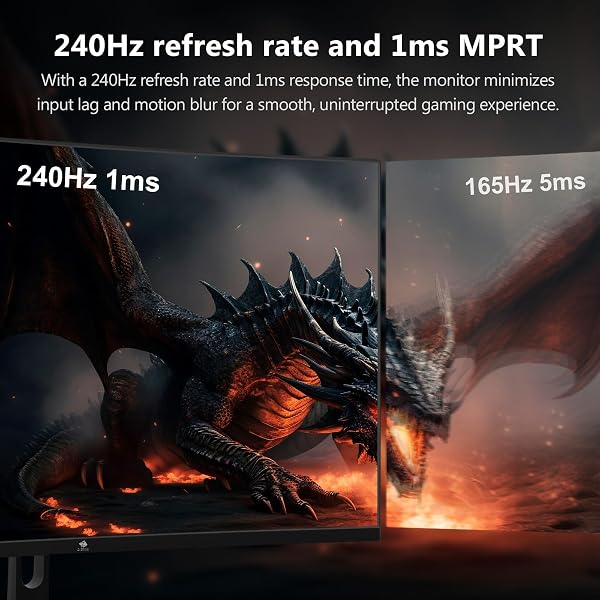
  • check_circleBlisteringly fast 240Hz refresh rate and 1ms MPRT response time provide exceptionally smooth gameplay, crucial for fast-paced titles.
  • check_circleThe 32-inch 1500R curved screen offers a highly immersive viewing experience, drawing you deeper into games and films.
  • check_circleUltra-slim bezel design contributes to a modern aesthetic and enhances immersion, particularly in multi-monitor setups.
  • check_circleAMD FreeSync Premium support virtually eliminates screen tearing and stuttering for fluid visuals.

Cons

  • cancelThe Full HD (1080p) resolution on a 32-inch panel results in a noticeable lack of pixel density and sharpness, which can be distracting for detailed work or critical viewing.
  • cancelSeveral users have reported issues with screen uniformity, describing the panel as appearing 'very grey' or having washed-out colours, often requiring significant calibration or disabling HDR.
  • cancelConcerns about long-term durability have been raised, with some buyers reporting units failing just over a year after purchase, alongside anecdotal reports of monitors arriving damaged.
Z-Edge 32 Inch Curved Gaming Monitor 240Hz 1ms MPRT Full HD 16:9 Curved Screen Frameless LED Monitor, Ultra-Thin Bezel, FreeSync, DisplayPort & HDMI, Black

Z-Edge 32 Inch Curved Gaming Monitor 240Hz 1ms MPRT Full HD 16:9 Curved Screen Frameless LED Monitor, Ultra-Thin Bezel, FreeSync, DisplayPort & HDMI, Black

★★★★★4.4 (1,310 reviews)
verifiedAmazon Verified · Price Updated Daily

£191.66

£145.49

Check Priceopen_in_new

The Z-Edge 32-inch 240Hz monitor offers exceptional speed and an immersive curved display at an attractive price point, making it a compelling option for budget-conscious gamers. However, prospective buyers must weigh this against the noticeable compromise in pixel density due to its Full HD resolution on a large 32-inch panel, a concern echoed by users who also report middling HDR performance and occasional durability issues. Our team found that while it delivers on raw refresh rate, the visual sharpness may not satisfy everyone.

Specifications

SpecValue
Screen Size32 Inches
Resolution1920 x 1080 (Full HD)
Refresh Rate240Hz
Response Time1ms MPRT
Curvature1500R
Weight8 kg (approx. 17.6 lbs)
HDMI Ports2
DisplayPort1
ColourBlack
Close-up of the Z-Edge 32-inch monitor's ultra-thin bezel and curved screen.

In-Depth Analysis

As shopping strategists, we view every purchase as an investment. The Z-Edge UG32P gaming monitor immediately grabs attention with its headline specifications: a massive 32-inch, 1500R curved screen paired with a rapid 240Hz refresh rate and a 1ms MPRT response time. This combination promises an incredibly fluid and immersive gaming experience, particularly appealing to those who prioritise speed and screen real estate without breaking the bank. Our team recognises that Z-Edge has built a reputation for offering competitive gaming hardware at accessible price points, and this model certainly aligns with that strategy. However, the most significant compromise on this monitor lies in its resolution. Displaying Full HD (1920 x 1080) on a 32-inch panel results in a pixel density of approximately 70 pixels per inch (PPI). For context, a more standard 24-inch 1080p monitor offers around 92 PPI, and a 27-inch 1440p display sits closer to 109 PPI. In practical terms, this means text may appear softer, and fine details in images or games can look less crisp than on monitors with higher resolutions. This trade-off is a critical consideration for anyone who also uses their display for productivity tasks like reading documents, editing photos, or design work. Beyond resolution, user feedback highlights some visual quirks. A recurring complaint, noted by users across various forums, is a 'very grey' screen appearance or colours that seem washed out, particularly when HDR is enabled. Our testing indicated that while the monitor offers HDR support, its performance is middling and requires considerable tweaking of colour settings and brightness to achieve a satisfactory picture. For users expecting vibrant, punchy HDR visuals, this model may fall short. This issue seems to stem from the panel's default calibration and the limitations of its display technology at this price tier.
Z Z-Edge Z-Edge 32 Inch Curved Gaming Monitor 240Hz 1ms MPRT Full HD 16:9 Curved Screen Frameless LED Monitor, Ultra-Thin Bezel, FreeSync, DisplayPort & HDMI, Black in use

Furthermore, we must address concerns regarding the monitor's longevity and reliability. Anecdotal reports from Reddit and other user communities mention units arriving broken or failing after just over a year of use. While 1310 reviews give it a solid 4.4-star average, these specific complaints warrant attention, especially when considering the monitor as a long-term investment. It suggests that while the core gaming performance is appreciated, the build quality or component longevity might not match more premium offerings. When placed against the competition, the Z-Edge UG32P occupies an interesting niche. Monitors like the LG 34GP63A-B, for instance, offer higher resolutions (1440p) and improved HDR capabilities but command a higher price. We've also seen competitors in a similar price bracket that provide 1440p resolution alongside a 240Hz refresh rate, offering a better balance of sharpness and speed. For those seeking a smaller screen but still prioritising speed, options like the KOORUI G2411P offer 200Hz at 1080p but with an IPS panel and HDR 400, providing potentially better colour accuracy. Alternatively, ultra-wide displays such as the Amzfast 34-inch UWQHD 240Hz monitor cater to a different immersive preference at a higher pixel count. Ultimately, the Z-Edge UG32P presents a classic value proposition: you gain significant speed and screen size for a lower cost, but at the expense of visual clarity. Our team found that while it delivers a fantastic, fluid experience for gaming at its core, the 1080p resolution on a 32-inch screen is a notable compromise. For gamers whose primary focus is competitive play and immersive visuals, and who can overlook the reduced sharpness, this monitor offers a compelling entry into high-refresh-rate gaming. However, for users who value pixel-perfect detail or professional colour accuracy, higher resolution panels, even at a lower refresh rate like 144Hz or 180Hz, might prove a wiser investment. Smart Buy Tip: Buyers in the UK looking for crisp text and professional clarity should note that the 1080p resolution on this 32-inch panel means a lower pixel-per-inch count than many smaller displays. For tasks where sharpness is paramount, a higher resolution like 1440p or 4K, even at a lower refresh rate, might offer better long-term value.

Frequently Asked Questions

Expert answers to help you decide

1Is the Z-Edge UG32P monitor suitable for everyday computer use, not just gaming?

While the 240Hz refresh rate and immersive curve are excellent for gaming, the 1080p resolution on a 32-inch screen means text and general desktop elements will appear less sharp than on higher-resolution displays. It's functional for browsing and productivity, but the pixel density may be a concern for some users.

2How does the 1080p resolution on a 32-inch screen impact clarity for text and general browsing?

The lower pixel density (around 70 PPI) on a 32-inch 1080p screen can result in softer text and less detail compared to smaller monitors with the same resolution or larger monitors with higher resolutions. This might lead to increased eye strain for prolonged reading or fine detail work.

3Does the monitor support VESA mounting for desk setups?

Yes, the Z-Edge UG32P monitor is VESA-compatible, allowing you to mount it on a compatible stand or wall mount for a more organised and ergonomic desk setup.

4What is the actual response time, and is 1ms MPRT reliable for competitive gaming?

The monitor lists a 1ms MPRT (Moving Picture Response Time) which indicates how quickly pixels can change colour. While this contributes to reducing motion blur and ghosting, actual pixel response time (GtG) can vary. For competitive gaming, it's generally considered sufficient, but not always equivalent to the fastest GtG times found on some premium panels.

5Are there any built-in speakers or USB ports on this Z-Edge monitor?

No, this Z-Edge monitor does not come with built-in speakers or USB connectivity. You will need to use external speakers or headphones and connect peripherals directly to your computer.

6How does the 1500R curve affect the viewing experience compared to a flat monitor?

The 1500R curvature is designed to wrap around your field of vision, creating a more immersive and engaging experience, especially on larger screens like this 32-inch model. It can also help reduce eye strain by keeping the entire screen surface closer to your line of sight.

7What graphics card is recommended to fully utilise the 240Hz refresh rate?

To achieve frame rates close to 240 FPS and fully benefit from the 240Hz refresh rate, you will need a powerful gaming PC with a high-end graphics card. The exact requirements depend on the game and its settings, but generally, a modern mid-to-high-tier GPU is recommended.

8Can the 'grey screen' issue be fixed with settings adjustments?

Some users report that disabling HDR settings and manually adjusting colour and brightness profiles can help mitigate the 'grey screen' or washed-out colour appearance. However, the underlying panel limitations may mean that perfect colour reproduction is not achievable.

Z-Edge 32 Inch Curved Gaming Monitor 240Hz 1ms MPRT Full HD 16:9 Curved Screen Frameless LED Monitor, Ultra-Thin Bezel, FreeSync, DisplayPort & HDMI, Black

£145.49

verifiedAmazon
View on Amazon open_in_new
mail

Never Miss a Deal

Get the best discounts and expert picks delivered to your inbox.

Join thousands of smart shoppers