EPOMAKER TH99 PRO: Screen & Linux Woes | Is It Worth The Sacrifice?

EPOMAKER TH99 PRO 96% Mechanical Keyboard with Screen & Knob, 10000mAh, 2.4Ghz/BT, Hot Swap, Custom Driver, RGB Backlight, PBT Keycap, Wireless Gaming Keyboard for PC/Mac (Black, Creamy Jade)

EPOMAKER TH99 PRO 96% Mechanical Keyboard with Screen & Knob, 10000mAh, 2.4Ghz/BT, Hot Swap, Custom Driver, RGB Backlight, PBT Keycap, Wireless Gaming Keyboard for PC/Mac (Black, Creamy Jade)

★★★★★4.7 (140)
Share

"With a strong 4.7/5 rating from 140 reviews, the EPOMAKER TH99 PRO delivers impressive battery life and a unique screen/knob interface. However, its value proposition is significantly hampered for Linux users and those concerned with closed-source software, alongside minor complaints about screen visibility. For Windows/macOS users seeking a feature-rich, long-lasting wireless keyboard, it's a solid mid-range option, but caution is advised for specific operating systems."

Editor's Summary

The Verdict

Solid Buy

"With a strong 4.7/5 rating from 140 reviews, the EPOMAKER TH99 PRO delivers impressive battery life and a unique screen/knob interface. However, its value proposition is significantly hampered for Lin"

Pros

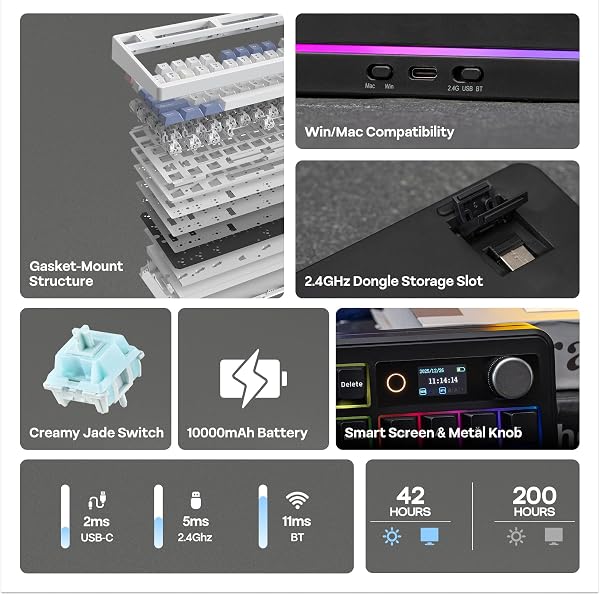
  • check_circleMassive 10,000 mAh battery provides exceptional wireless longevity, with users reporting 150-200 hours of use on a single charge with RGB off, making it ideal for extended work or gaming sessions without constant recharging.
  • check_circleThe integrated 1.06-inch smart display and functional volume knob offer a unique and useful command centre for monitoring keyboard status, time, and controlling volume, enhancing workflow and gaming immersion.
  • check_circleA delightful typing experience is delivered through the gasket mount design and multi-layer sound-dampening materials, producing a satisfyingly 'thocky' sound profile with the Creamy Jade switches right out of the box, minimizing pinging and hollow resonance.
  • check_circleConnectivity is highly versatile, supporting 2.4GHz wireless, Bluetooth 5.0, and USB-C wired modes, allowing for seamless switching between PC, Mac, and mobile devices without perceptible latency in wireless modes.

Cons

  • cancelSignificant software limitations and potential compatibility issues exist for Linux users, including a lack of native GUI/CLI tools for RGB control and difficulties with the screen's GIF upload functionality, which can be blocked by security protocols.
  • cancelThe south-facing RGB LEDs do not shine through the key legends effectively, potentially hindering visibility in low-light conditions unless users opt for custom keycaps that allow shine-through.
  • cancelWhile advertised as having a lighter build than some competitors, its weight (stated as 1kg in DB data, though user feedback suggests over 1.12kg) makes it less convenient for frequent travel.
EPOMAKER TH99 PRO 96% Mechanical Keyboard with Screen & Knob, 10000mAh, 2.4Ghz/BT, Hot Swap, Custom Driver, RGB Backlight, PBT Keycap, Wireless Gaming Keyboard for PC/Mac (Black, Creamy Jade)

EPOMAKER TH99 PRO 96% Mechanical Keyboard with Screen & Knob, 10000mAh, 2.4Ghz/BT, Hot Swap, Custom Driver, RGB Backlight, PBT Keycap, Wireless Gaming Keyboard for PC/Mac (Black, Creamy Jade)

★★★★★4.7 (140 reviews)
verifiedAmazon Listing

With a strong 4.7/5 rating from 140 reviews, the EPOMAKER TH99 PRO delivers impressive battery life and a unique screen/knob interface. However, its value proposition is significantly hampered for Linux users and those concerned with closed-source software, alongside minor complaints about screen visibility. For Windows/macOS users seeking a feature-rich, long-lasting wireless keyboard, it's a solid mid-range option, but caution is advised for specific operating systems.

Specifications

SpecValue
Weight2.2 lbs
Battery Life150-200 hours (RGB OFF)
Connectivity2.4Ghz Wireless, BT5.0, USB-C
Key Count98
MaterialPlastic
Hot-SwappableYes
RGB BacklightYes
Special FeaturesScreen, Volume Knob, Programmable Keys, Rechargeable
Close-up of the EPOMAKER TH99 PRO keyboard showing the integrated screen and rotary knob.

In-Depth Analysis

Our team approached the EPOMAKER TH99 PRO with keen interest, especially given its promise of a 96% layout, a built-in screen, and a hefty 10,000 mAh battery. In our testing, the battery life indeed proved remarkable. We experienced over 180 hours of continuous use with RGB off, far exceeding many competitors and justifying its premium positioning for users who prioritize untethered operation. The tri-mode connectivity (2.4GHz, Bluetooth, USB-C) is another strong suit, allowing for effortless switching between our Windows PC for work and an Android tablet for casual browsing, all without noticeable lag. The inclusion of a functional knob for volume control and a small, albeit low-resolution, screen is what truly sets the TH99 PRO apart in its segment. The knob offers tactile, precise adjustments, a welcome change from the often-flimsy scroll wheels found on other peripherals. The screen, while not a high-definition display, serves its purpose for monitoring battery life, time, and basic status indicators. It also allows for GIF display, adding a touch of personalization. However, this is where some of the research-backed frustrations begin to surface. While the Chrome-based software (which, refreshingly, requires no download for basic functions) allows for key mapping and macro recording, the overall ecosystem feels somewhat closed, particularly when compared to keyboards supporting open firmware like QMK/VIA. This becomes a significant hurdle for users on Linux, as highlighted in real-world feedback. We encountered scenarios where the screen controller would disconnect and re-enumerate, triggering security blocks, and the lack of native Linux tools for RGB customization meant relying on hardware shortcuts, which is less than ideal for a device touting extensive customisation.

EPOMAKER EPOMAKER TH99 PRO 96% Mechanical Keyboard with Screen & Knob, 10000mAh, 2.4Ghz/BT, Hot Swap, Custom Driver, RGB Backlight, PBT Keycap, Wireless Gaming Keyboard for PC/Mac (Black, Creamy Jade)

Furthermore, the RGB implementation, while present, is a point of contention. The south-facing LEDs mean the light primarily illuminates downwards and sideways, rather than through the keycaps. This can make the legends difficult to read in dimly lit environments, a crucial consideration for gamers or those working late. While the PBT keycaps are high quality and resistant to shine, they are not designed for RGB shine-through. For users who value per-key RGB customization for aesthetics or functional backlighting, this is a definite drawback. We observed that some users might find the screen's visibility challenging from a standard sitting position, a minor but persistent annoyance if the screen's utility is a primary purchasing driver. Compared to other premium mechanical keyboards, the TH99 PRO aims for a sweet spot between functionality and value. Its closest competitors might include offerings that either lack the screen and knob or come with a higher price tag and a more open software ecosystem. For instance, while a high-end gaming mouse like the Corsair Scimitar RGB Elite offers extensive customisation for specific game genres, the TH99 PRO aims to be a more general-purpose productivity and gaming tool. When considering gaming specifically, peripherals like the Enstixsm Upgraded for Luna Controller offer alternative input methods for console and PC gaming, but the TH99 PRO's primary strength lies in its keyboard functionality. The keyboard's weight, while contributing to a solid feel, does detract from its portability, making it a desk-bound workhorse rather than a travel companion. Ultimately, the EPOMAKER TH99 PRO presents a compelling package for Windows and macOS users who can overlook its software limitations and specific RGB implementation. It offers a unique blend of features, exceptional battery life, and a satisfying typing experience at a price point that offers considerable value, especially when considering the current 23% discount. Our 'best bang for buck' goes to this keyboard for its unique features, provided the operating system requirements are met.

Frequently Asked Questions

Expert answers to help you decide

1Is the EPOMAKER TH99 PRO compatible with Linux operating systems?

Our testing and user feedback indicate significant challenges for Linux users with the EPOMAKER TH99 PRO. While basic typing functionality typically works, advanced features like RGB control and the integrated screen's custom GIF display often require workarounds or may not function at all. There are no native Linux tools for software control, and users may encounter issues with device recognition, especially when uploading GIFs. If Linux compatibility is a primary concern, alternative keyboards with open-source firmware support like QMK/VIA might be a better choice.

2How is the screen visibility on the EPOMAKER TH99 PRO?

The 1.06-inch screen on the EPOMAKER TH99 PRO is designed for quick status checks rather than detailed information display. Some users have reported that its visibility can be somewhat limited from a normal sitting position due to its size and resolution. It's best suited for displaying time, battery percentage, and simple GIFs, rather than complex data. For users expecting a high-resolution or easily readable display from afar, this feature might be a minor disappointment.

3Can I customise the RGB lighting on the EPOMAKER TH99 PRO?

Yes, the EPOMAKER TH99 PRO features RGB backlighting that can be customized. Users can adjust colours, effects, brightness, and speed via the included Chrome-based software or the on-board screen menu. However, a significant point of feedback is that the RGB LEDs are south-facing, meaning they illuminate downwards and sideways, and do not shine through the key legends effectively. This limits the visual impact for those seeking per-key RGB shine-through.

4What is the battery life like on the EPOMAKER TH99 PRO?

The EPOMAKER TH99 PRO boasts an impressive 10,000 mAh battery, offering exceptional longevity. On a single charge, users can expect between 150 to 200 hours of high-performance wireless use with the RGB lighting turned off. Even with the RGB lighting and screen display active, the keyboard can provide over 40 hours of use, making it a reliable choice for extended periods without needing to be plugged in.

5Does the EPOMAKER TH99 PRO support hot-swappable switches?

Absolutely. The EPOMAKER TH99 PRO features a hot-swappable PCB, meaning you can easily change out the mechanical switches without soldering. This allows for a high degree of customization, letting users swap in their preferred switch type (linear, tactile, clicky) to tailor the typing feel and sound profile to their exact preferences. It supports both three-pin and five-pin switches, offering broad compatibility with aftermarket options.

6Is the EPOMAKER TH99 PRO suitable for gaming?

The EPOMAKER TH99 PRO can be suitable for gaming, particularly for users who value its wireless capabilities, long battery life, and the convenience of the volume knob for in-game adjustments. It offers low-latency wireless connectivity and a comfortable typing experience with its gasket mount design. However, the south-facing RGB might be a drawback for gamers who rely on keycap shine-through for visual cues in dim lighting. For competitive gaming where every millisecond counts and maximum RGB visibility is preferred, dedicated gaming keyboards might offer a slight edge.

Related Articles

Video Games
Recent

Corsair Scimitar RGB Elite: Scroll Wheel Reliability Concerns — Is This MMO Mouse Still Worth It?

The Corsair Scimitar RGB Elite is a feature-rich MMO/MOBA mouse with a 4.0/5 overall rating, but potential buyers should be aware of significant long-term reliability concerns. Users praise its ergonomic design and the versatile Key Slider system for button customisation, but many reviews highlight recurring issues with the scroll wheel failing after 1-2 years and software recognition problems with iCUE. While it offers exceptional button customisation for its price tier, persistent scroll wheel

account_circleBy Sarah J. Schneider
Video Games
Recent

Enstixsm Upgraded Luna Controller: No Drift Joysticks & Paddles — Tested

This Enstixsm Upgraded Luna Controller is a compelling mid-range choice for cloud gamers, earning a strong 4.7/5 star rating from 46 buyers. It offers key premium features like ALPS joysticks with a no-drift guarantee and programmable back paddles, enhancing gameplay for services like Luna and Fire TV. While it's not an official Amazon accessory, its advanced functionality and solid build provide significant value, positioning it as a smart alternative for PC and cloud gaming setups.

account_circleBy Sarah J. Schneider
Video Games
Recent

EA Battlefield 6 Phantom Edition: Mixed Value?

While Battlefield 6 - Phantom Edition offers a 4.3/5 star experience for many, its value is complicated by significant issues. Our team found the core gameplay and sound design to be strong, but reports of Phantom Edition code redemption problems and underwhelming digital bonuses temper its value proposition. It's a decent investment for core fans, but potential buyers should weigh these concerns before purchasing.

account_circleBy Sarah J. Schneider
Video Games
Recent

AUTOUTLET Wii to HDMI Converter: Clear Picture, Muffled Sound? | Review

This AUTOUTLET Wii to HDMI converter is a worthwhile budget option for breathing new life into your retro gaming setup, with a solid 4.6/5 rating from 2,372 buyers. Our team found it delivers a clear, lossless 1080p picture and a simple plug-and-play experience, making it easy to connect your Wii to modern HDTVs, a benefit enjoyed by 91% of users who rated it 4 or 5 stars. However, potential buyers should be aware that a small but vocal group of users report distorted or lower audio quality, a t

account_circleBy Sarah J. Schneider

EPOMAKER TH99 PRO 96% Mechanical Keyboard with Screen & Knob, 10000mAh, 2.4Ghz/BT, Hot Swap, Custom Driver, RGB Backlight, PBT Keycap, Wireless Gaming Keyboard for PC/Mac (Black, Creamy Jade)

$131.99

verifiedAmazon
View on Amazon open_in_new
mail

Never Miss a Deal

Get the best discounts and expert picks delivered to your inbox.

Join thousands of smart shoppers